Formahand now has 16 store themes to pick from
Sixteen finished looks for your store, from fashion and food to a blank start, each with desktop and phone previews and included on every plan.
Formahand now has 16 themes for an online store, and your store can wear any of them: six original themes, seven design themes and three starters. Each one is a finished look: a header, a footer and pages laid out and ready for your products and your words. The Free plan includes all of them.
Three kinds of theme
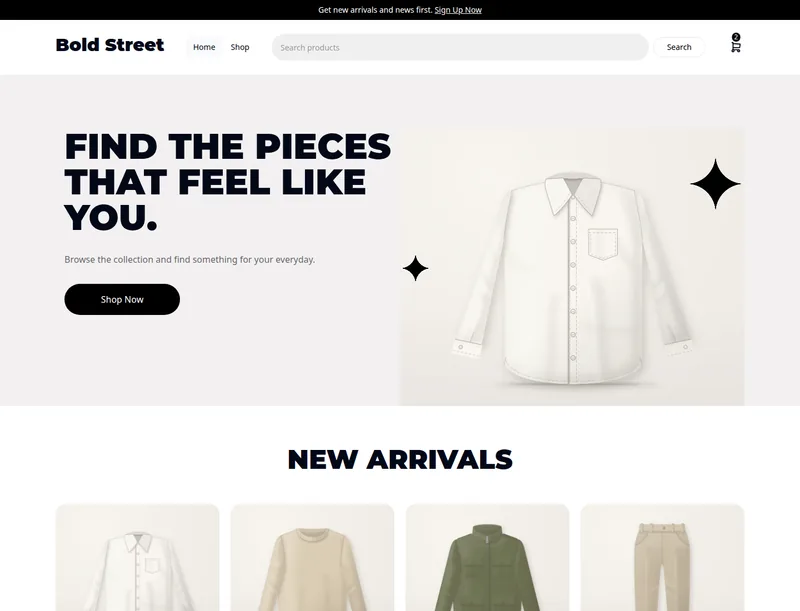
Six original themes. Bold Street, Luma, Corner Pantry, Noir, Gridline and Warm Roast bring their own header, footer and home page, and keep what is already yours: your colours, typefaces, words and menus.
Seven design themes. Rounded Edit, Sage Apothecary, Pale Studio, Quiet Wardrobe, Fitting room, Checkerboard Aperitif and Garden Room are whole looks, with their own colours, typefaces and menus. Each is adapted from a design kit shared under an open licence, and its page credits the designer.
Three starters. Clean grid and Editorial promo are simple looks to build on. Blank canvas is a blank start: plain sections you fill in with your own words and pictures.
All sixteen
| Theme | For | In one line |
|---|---|---|
| Bold Street | Fashion | Bold black type, a big hero with your newest product and grey product tiles. |
| Luma | Home and gifts | Calm and minimal: a thin header, a tall hero and roomy product rows. |
| Corner Pantry | Food and drink | A playful pantry look in orange and cream with a big serif hero. |
| Noir | Fashion | Sleek and dark, with a three-tile product grid and a scrolling row. |
| Gridline | Tech | Precise and product-first: a full-width hero and tidy product cards. |
| Warm Roast | Food and drink | A warm coffee-roaster look with a story band and an olive footer. |
| Rounded Edit | Fashion | Clean and white, with big rounded picture cards and black pill buttons. |
| Sage Apothecary | Beauty | Sage and cream for beauty and wellness, with a light serif headline. |
| Pale Studio | Fashion | Pale and sharp: heavy capitals, round black buttons and a picture band. |
| Quiet Wardrobe | Fashion | Black and white, with full-width pictures and small light type. |
| Fitting room | Fashion | Warm stone colours, tall condensed capitals and one product shown large. |
| Checkerboard Aperitif | Food and drink | A bold drinks look: a huge wordmark, a checker border and caramel blocks. |
| Garden Room | Home and gifts | A bright florist look with a huge rounded name and yellow buttons. |
| Clean grid | Starter | White space, one split hero and a tidy product grid. |
| Editorial promo | Starter | Warm and magazine-like, with a picture-led opening and an offer band. |
| Blank canvas | Starter | A blank start: plain sections you fill in with your own words and pictures. |
Every theme's page shows it on a computer and on a phone, and lists the pages it lays out. See them side by side on the themes page.
How to pick one
- Open Online Store → Storefront settings → Design.
- Filter the list by the kind of shop you run, and open Preview to see a theme large, on a computer and a phone.
- Press Use this theme. You are told what will change and asked once to confirm.
- Change what you like in the editor, then publish.
Picking a theme changes your draft only. Shoppers see nothing new until you publish, so you can try a few. Your products, collections, orders and customers are never touched.
If you use an AI agent, it can do the same: list_themes shows every theme with its pictures, and the set-theme command puts one on your draft. Themes has the details, and Open an online store with your AI agent shows how to connect one.